


Dark mode has been one of the most persistent rendering challenges in HTML email, particularly in Gmail’s mobile applications. Historically, Gmail could apply its own dark-mode transformation to an email instead of honoring the developer’s intended light/dark presentation. That behavior would change backgrounds, text, borders, buttons and other colors, sometimes producing a result that was visually different from the approved design.
Recent reporting from email-community experts indicates that Gmail’s iOS and Android apps now support the HTML <meta name=”color-scheme” content=”light only”> declaration for emails. When Gmail honors that declaration, the message can identify itself as a light-only document, allowing the light version to remain intact instead of being subjected to Gmail’s forced dark-mode color transformation. Mark Robbins reported the change in September 2026 and also noted an important limitation: his testing found that the behavior applied to Google-hosted Gmail accounts, while Gmail used with non-Google accounts could remove the meta tag and therefore not receive the same benefit.
For email developers, this is a significant change in the dark-mode workflow. It does not mean that every email should automatically become light-only. Instead, it introduces another deliberate rendering strategy: if a campaign has a carefully controlled light design and the priority is to prevent Gmail from altering that design, a light-only declaration can be considered, provided the target audience, supported clients, and QA results justify it.
In this blog, we’ll break down what changed in Gmail, how the light-only declaration works, where it falls short, and how to test it properly before using it in your production templates.
TL;DR


Why Gmail dark mode has been difficult for email developers
HTML email does not behave like a normal web page. Every mailbox and rendering engine can impose its own restrictions, and dark mode adds another layer of client-specific behavior. Instead of simply switching between two complete stylesheets, an email client may alter colors after the email has already been authored.
This matters because email designs often depend on precise brand colors, contrast relationships, image treatment and component hierarchy. A white background may be changed to a dark gray; dark text may be changed to a light color; a carefully selected CTA color may be altered; and border or table colors may no longer match the intended design.
Historically, Gmail’s documented and community-observed behavior around color-scheme controls was restrictive. A 2020 Gmail Community discussion specifically reported that Gmail did not support the color-scheme meta tags or prefers-color-scheme media query for email at that time. That historical limitation is important because it explains why email teams developed numerous Gmail-specific dark-mode workarounds.
The situation is now changing. Recent industry reporting says Gmail’s iOS and Android apps can recognize a light-only color-scheme declaration, which changes the practical approach available to developers.
What is the ‘color-scheme’ meta tag?
The color-scheme declaration communicates which color schemes a document supports. In standard HTML, values can indicate light mode, dark mode, or both. The special value `only light` means the document is intended to use a light presentation and does not support a dark presentation. MDN documents `only light` as a valid value for the color-scheme meta element.
<meta name="color-scheme" content="light only" />For email, the practical significance is not that this tag magically redesigns an email. Rather, it gives a supporting client information about the email’s intended color-scheme behavior. In the new Gmail scenario, that information can prevent Gmail from applying its own dark-mode transformation to a light-only email.
What changed in Gmail?
In September 2026, email-community expert Mark Robbins reported that Gmail had addressed the forced-dark-mode issue in both its iOS and Android apps. His report states that Gmail now supports the color-scheme meta tag for forcing the light version of an email to remain visible, using:
<meta name="color-scheme" content="light only" />This is a meaningful shift from the earlier Gmail behavior in which developers had limited control over Gmail’s mobile dark-mode transformation. The change means developers can now explicitly tell supporting Gmail clients that the email is designed only for light mode.
However, this should be described as a client-behavior improvement rather than a universal dark-mode solution. Gmail behavior can vary by application, account type and implementation. The current evidence is also based in part on industry testing and reporting rather than a detailed public Gmail developer specification covering every email-rendering scenario.
The core problem: forced color inversion
To understand why this matters, consider a simple branded email. Imagine a template with a white canvas, a light cream content area, black body copy, a red CTA and several dark-blue headings. In a forced dark-mode environment, the client may transform some or all of those colors.
- White backgrounds can become dark backgrounds.
- Dark text can become light text.
- Brand colors can be shifted to other tones.
- CTA backgrounds can change unexpectedly.
- Borders and separators can lose the intended contrast.
- Light sections and dark sections can end up with inconsistent relationships.
- Images may remain unchanged while surrounding HTML colors are transformed, creating visual mismatches.
The result is particularly problematic when the design depends on a fixed brand palette. The email may technically remain readable while no longer looking like the approved creative.

The new light-only approach
The new approach is conceptually straightforward: instead of trying to fight every individual Gmail color transformation with CSS hacks, declare that the email only supports the light color scheme.
When a supporting Gmail environment honors the declaration, the light version of the email can remain intact even when the user’s Gmail interface is using dark mode. This is particularly useful for templates where there is no separately designed dark-mode version and where preserving the approved light design is more important than adapting the email to the user’s dark preference.
Light-only does NOT mean ‘dark mode is broken’
A crucial distinction is that light-only rendering and dark-mode support are two different strategies.

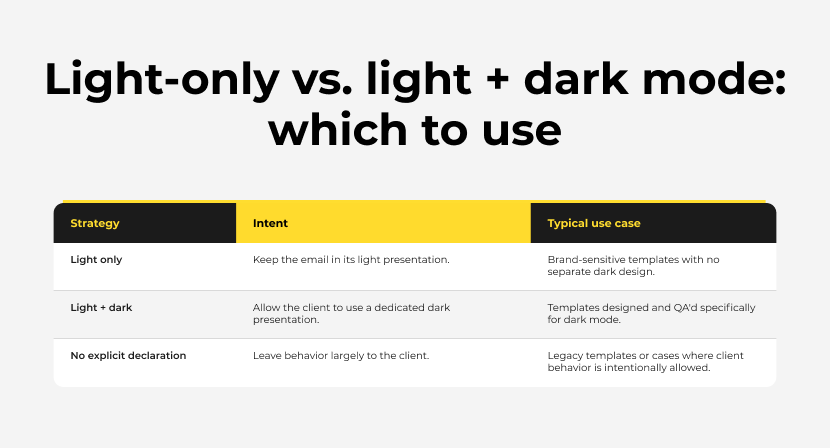
Therefore, adding `light only` should be treated as a design decision, not simply a new default line of code. If the email has a carefully developed dark-mode experience, forcing light mode may prevent that dark-mode experience from appearing in clients that honor the declaration.
Interaction with ‘prefers-color-scheme’
This is one of the most important considerations for developers who already maintain dark-mode CSS. The `prefers-color-scheme` media query is commonly used in email clients that support author-defined dark-mode styling.
<style>
  @media (prefers-color-scheme: dark) {
    .darkmode-bg {
      background-color: #111111 !important;
    }

    .darkmode-text {
      color: #ffffff !important;
    }
  }
</style>
Mark Robbins noted that using the light-only meta declaration can affect how dark-mode media queries behave in other clients, including Apple Mail. His recommendation for retaining dark-mode behavior elsewhere was to declare the CSS root as supporting both schemes, for example:
The important point is that developers should not blindly combine declarations and assume identical behavior across every mailbox. The interaction between the HTML meta declaration, CSS `color-scheme`, `prefers-color-scheme`, and each email client’s parser needs to be validated through rendering tests.
Why this is valuable for production email templates
For production teams, the biggest advantage is consistency. A template can be approved against a specific light-mode design and then retain that presentation in supported Gmail mobile environments rather than being automatically recolored.
- Brand consistency: approved colors are less likely to be transformed by Gmail’s dark-mode algorithm.
- CTA consistency: button/background colors can remain aligned with the design.
- Better screenshot fidelity: rendered Gmail screenshots can more closely match the approved creative.
- Reduced dark-mode patching: fewer Gmail-specific color overrides may be required for light-only campaigns.
- Simpler maintenance: a template that does not require a separate dark design can remain intentionally light.
- Cleaner QA logic: the team can explicitly test a light-only strategy rather than treating Gmail dark mode as an uncontrolled variable.
What this does not solve
The update should not be interpreted as a universal fix for every dark-mode issue in email. Several limitations remain.
1. Not every email client necessarily honors the declaration.
2. Gmail behavior may vary between iOS, Android, desktop web and other environments.
3. Account type matters. Mark Robbins reported that his testing showed the workaround working for Google emails but not for Gmail accounts using non-Google providers, where the meta tag was removed.
4. A light-only strategy does not create a dark-mode design.
5. Images can still create contrast problems if the surrounding HTML and image artwork are not designed together.
6. Forwarding, replies and message transformations can alter the final markup.
7. ESP processing may modify, sanitize or relocate parts of the email head.
8. Email-service-provider editors may strip unsupported head content.
9. A template still needs testing in real Gmail applications and representative devices.
The account-type limitation is particularly important for QA teams. The Gmail application is not necessarily equivalent to every mailbox opened through Gmail’s interface. A test result from a Google account should not automatically be generalized to all accounts accessed through Gmail.
ESP and template-builder considerations
The biggest implementation risk may not be the HTML itself—it may be the platform that processes the HTML before the subscriber receives it.
- Confirm that the ESP preserves the meta tag in the final delivered source.
- Inspect the actual received message rather than relying only on the source HTML uploaded to the platform.
- Check whether the platform’s editor rewrites the <head> section.
- If a modular template is used, verify that the declaration exists once in the final document head.
- Avoid placing the declaration inside a module body where it may be stripped or moved.
- Re-test after major ESP template-editor changes, because platform processing can change over time.
This is especially relevant for modular templates used across Salesforce Marketing Cloud, Marketo, HubSpot, Mailchimp and other ESPs. The exact HTML-processing behavior differs by platform, so the delivered source is the final authority for QA.
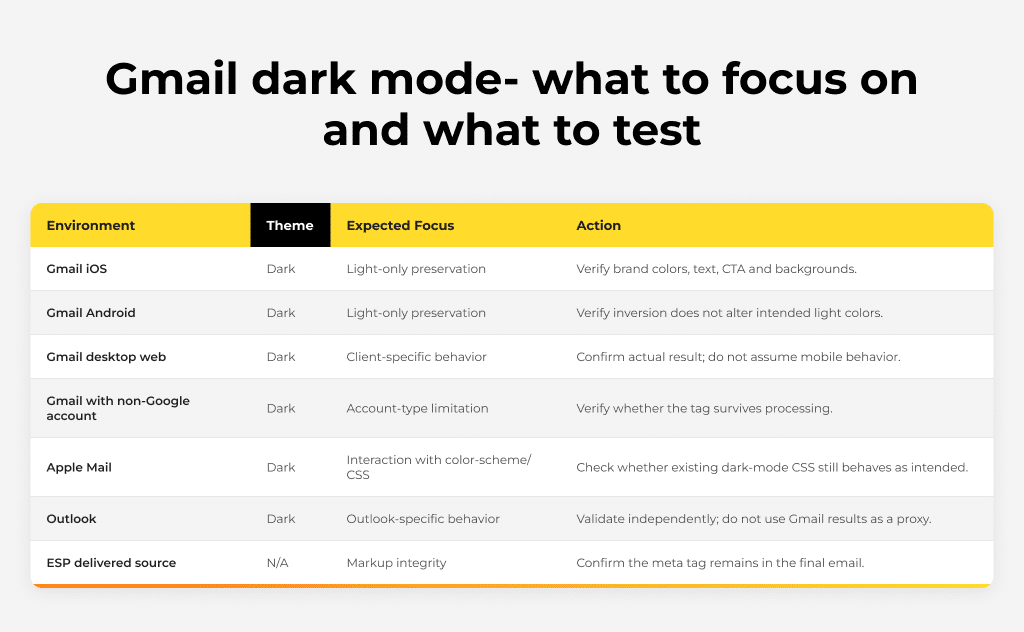
Dark mode QA: a new testing matrix
A robust QA process should compare the intended rendering strategy with the actual client result. For a light-only template, the test should not simply ask, ‘Does dark mode look dark?’ The correct question is, ‘Does the light design remain intact in the environments where the light-only declaration is expected to be honored?’

Before and after: the conceptual difference
Previous Gmail dark-mode workflow:
- Build the approved light version.
- Add dark-mode CSS and Gmail-specific workarounds where possible.
- Test Gmail mobile dark mode.
- Identify colors Gmail has changed.
- Add additional overrides or design compromises.
- Repeat QA after every significant template change.
Light-only workflow for applicable campaigns:
- Build the approved light version.
- Declare the email as light-only.
- Verify that the target Gmail applications honor the declaration.
- Validate the same template across other priority clients.
- Keep a true dark-mode version only where the campaign requires it.
The second workflow can be simpler for the right campaign, but only when the business and audience requirements support a light-only experience.
Accessibility considerations
Preventing automatic color transformation can improve visual consistency, but it does not automatically make an email accessible. The underlying light-mode design still needs sufficient contrast, meaningful link styling, accessible CTA treatment, logical reading order, alt text where appropriate, and sensible typography.
- Check text/background contrast in the approved light design.
- Do not rely on color alone to communicate meaning.
- Maintain visible focus/interaction cues where supported.
- Use descriptive alt text for meaningful images.
- Ensure CTA labels remain understandable without visual context.
- Test text size and line-height on mobile devices.
The key principle is that dark-mode control and accessibility are related but separate concerns. A light-only email can still fail accessibility requirements if the original light design has insufficient contrast or poor semantic structure.
Recommended implementation decision tree
- Does the campaign have a separate, approved dark-mode design?
- Yes → continue evaluating the existing dark-mode implementation; do not automatically force light mode.
- No → continue to the next question.
- Is preserving the exact light design more important than adapting to the user’s dark preference?
- Yes → test the light-only declaration.
- No → evaluate a client-aware dark-mode approach.
- Does the target Gmail audience use supported Google accounts and current app versions?
- Yes → include Gmail iOS/Android in the light-only test matrix.
- ·Unknown → treat the result as a compatibility item requiring broader QA.
- Does the ESP preserve the meta declaration?
- Yes → proceed to rendering QA.
- No → investigate ESP template/head processing before relying on the approach.
What email developers should watch going forward
- Whether Gmail expands the behavior consistently across desktop web and all account types.
- Whether Google publishes detailed documentation describing the supported scope.
- Whether ESPs preserve the meta declaration without modification.
- How the declaration interacts with future Gmail dark-mode changes.
- Whether other email clients adopt or change their interpretation of `light only`.
- Whether client support for author-defined dark mode improves enough to make full light/dark systems more predictable.
Email rendering changes are often incremental. A client can improve support without making every historical workaround obsolete immediately. Teams should therefore maintain a versioned QA matrix rather than assuming that one new feature eliminates all dark-mode testing.
Before vs after preview


Key takeaways
Gmail’s reported support for the `light only` color-scheme declaration is an important development for HTML email. For applicable campaigns, it provides a cleaner way to communicate that the email should remain in its light presentation rather than allowing Gmail’s mobile dark-mode transformation to alter the design.
The correct takeaway is not that dark-mode QA is no longer necessary. The more useful conclusion is that developers now have another rendering strategy to test and deliberately choose. Light-only emails, fully dark-mode-aware emails and client-dependent approaches can each have a place in an email-development system.
For production teams, the most important next step is to add the new declaration to a controlled test template, validate it across Gmail iOS and Android, inspect the delivered HTML, and compare the result with other priority email clients. Where the declaration is honored, the ability to preserve an approved light design can substantially simplify Gmail dark-mode handling.
At Email Mavlers, our 150+ email experts design and code emails that render perfectly well on all devices, email clients, and in light and dark modes. Need help fixing a template you have already coded or want to create a pixel-perfect email from scratch? Get in touch.