



The new Marketo Email Designer arrived with the kind of promise teams like to hear. Drag and drop. Build faster. Ship cleaner.
And in fairness, the UX is a major step forward. But once enterprise teams start converting legacy assets, a quieter truth shows up: rendering still matters, and it still bites.
That is where Marketo email designs stop being a visual problem and become an architectural one. The builder may be intuitive, but clean execution still depends on custom HTML engineering, modular structure, and the discipline to build for Outlook, Gmail, and everything in between.
If your email has to look perfect in front of high-value prospects, speed is not enough. Structure has to survive the trip.
Let’s cut to the chase.
What are the hidden rendering risks of the new email designer?
The new email designer makes complex layouts easy to assemble, but that visual convenience can generate bloated HTML and nested tables that break in Outlook and trigger Gmail clipping.
The new editor is easy to love. That is part of the problem.
When a builder becomes visually powerful, it becomes easier to create complex layouts without noticing what is happening under the hood. And in email, the under-the-hood part is where the trouble lives.
Marketers converting old templates often discover padding skips, font substitutions, and alignment quirks in desktop Outlook. That is not a mood issue. It is a rendering issue.
The conversion process can also produce dirty code. Nested tables pile up. CSS gets fragmented. The final HTML becomes heavier than it should be.
And then there is Gmail. Once HTML exceeds 102KB, Gmail clips the message. That hides CTAs, breaks the user experience, and wrecks tracking continuity, as if it never existed.
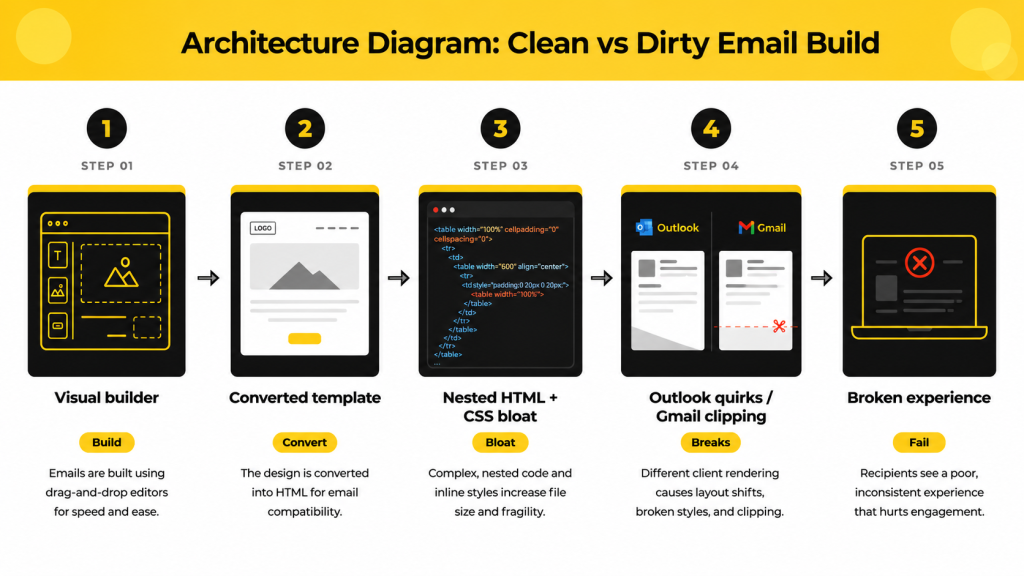
The real risk is not the builder itself. It assumes the builder can replace the engineering discipline.
Why is Fragment placement restricted in converted templates?
Converting legacy templates into the new designer often collapses structures into a single container, restricting Fragment placement and creating double-padding issues that distort the layout.
Fragments are the new reusable blocks. Headers. Footers. Disclaimers. Structural pieces that make scaling possible without redoing the whole email every time.
That is the theory. The reality is a little less graceful. aaa
Fragments must be dropped onto a Column. They cannot be dropped directly onto the Body. That sounds minor until a converted template collapses structure, and suddenly, your modular options become a narrow corridor.
Then comes the padding problem. Fragments carry their own internal padding, which is useful until a marketer drops one into a column that already has padding.
That is the double-padding trap. The spacing gets exaggerated. The hierarchy breaks. The layout starts looking like it lost a fight with itself.
We recommend using Fragments primarily for important, single-column structures. If you are building complex multi-column layouts, it is often better to build the structure within the email itself.
That advice is the point. Fragments are useful, but they are not magic. If the layout is already complex, the modular block should not be forced to carry the whole burden.
How does a custom-coded complex modular system solve these issues?
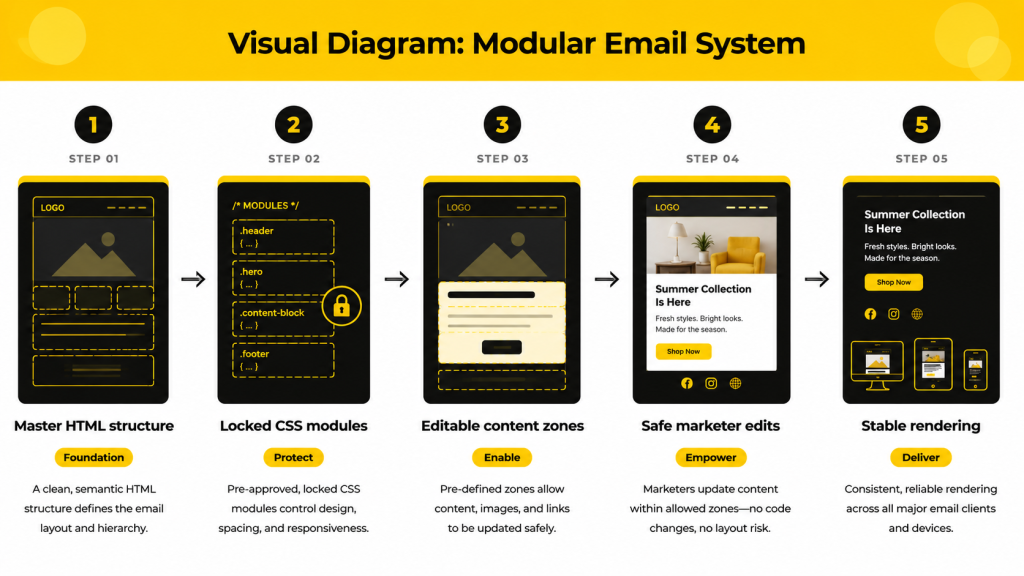
A coding agency can build a clean, modular architecture from scratch and lock the structure so marketers can edit content without breaking the CSS beneath it.
Here is the good news. The new designer is intuitive enough that a developer can rebuild a strong modular system faster than they can keep repairing a dirty conversion.
That is why custom code still wins. Not because drag-and-drop is bad. Because drag-and-drop is only as safe as the structure underneath it.
A strong coding agency starts from scratch. It does not patch broken legacy code until everyone pretends it is fine. It creates a clean, modular framework with real hierarchy, reusable blocks, and intentional spacing.
Then comes Content Locking. This is the part that protects the brand from accidental damage.
The CSS stays intact. The structure stays intact. Marketers can swap text, replace images, and make approved edits without touching the frame.
That matters for another reason, too. Adobe’s AI Assistant is moving the platform toward more generative workflows, including support for image generation. A rigid modular system gives AI the boundaries it needs.
In other words, the smarter the platform gets, the more important the skeleton becomes.
AI can accelerate the content. Only code can protect the shape.
DIY vs. coding agency: when should you outsource your Marketo templates?
DIY is fine for simple newsletters, but enterprise B2B teams running complex lifecycle journeys should use a coding agency to reduce technical debt and preserve deliverability.
This is the question MOPs leaders actually need answered.
Not “Can we build it?” But “Should we build it ourselves?”
The answer depends on complexity. If your sends are simple, your layouts are single-column, and your audience is not expecting architectural gymnastics, DIY can be enough.
But if you are running lifecycle flows, dynamic catalogs, or enterprise-grade personalization, the hidden cost of in-house tinkering rises fast.
| Decision Factor | DIY (In-House Marketing Team) | Specialized Marketo Coding Agency |
| Best use case | Basic newsletters and announcements | Complex lifecycle flows and dynamic catalogs |
| Technical debt | High over time | Low, due to clean build standards |
| Outlook & Gmail optimization | Risky, inconsistent | Engineered for cross-client stability |
| Brand governance | Easy to break | Protected with Content Locking |
| Speed to launch | Fast at first | Faster at scale |
The trick is not choosing the cheapest option. It is choosing the option that still works six months from now.
DIY is often the right call when the email is ordinary. Agency support is the right call when the email has to be reliable, scalable, and unbreakable under pressure.
How should teams think about Marketo email design in 2026?
The new Marketo designer is a leap in usability, but usability does not eliminate the need for clean code, modular structure, and rendering discipline. This is the deeper lesson. The editor is not the architect.
A great interface can make teams faster. It cannot make weak HTML strong.
That is why the best Marketo teams will treat the new designer as a delivery layer, not a substitute for engineering.
- They will use Fragments where Fragments make sense.
- They will avoid forcing modular pieces into layouts that were never built to hold them.
- They will call in a coding agency when the campaign is too important to risk visual drift.
Good email design is not about what looks easy to edit. It is about what stays intact when the inbox gets picky.
Wrapping up
That brings us to the business end of this article, where it’s fair to say that the new Marketo Email Designer is a real upgrade. It makes campaign building faster, cleaner, and easier to manage.
But a better UI does not replace structurally sound HTML. And it definitely does not erase the need for expert modular engineering when the stakes are high.
If your Marketo email designs need to survive Outlook, Gmail, conversion pressure, and growing campaign complexity, the answer may not be more DIY. It may be a cleaner foundation.
Connect with our Marketo email design experts today to devise your campaign strategy.

Ahmad Jamal - Content Writer
